Calculate per-bearing forces from web tension, wrap angle and roller tare. Check sensing direction, load shares and a candidate capacity, then send an RFQ.
TWO-SUPPORT ROLLER / CAPACITY REVIEW
Include the roller. Check each bearing.
Two supports, equal span tensions. Check tension and tare, then check the installed force direction and each sensor’s rating.
2 / Force direction and support shares
Angles use +x right, +y up: 0° right; +90° up; −90° down. Enter the web pull on the roller, then the positive arrow on the sensor.
Raw force, tared signal and the mechanical envelope.
The assumed envelope includes the bare roller at T = 0 and web tension up to k × Tmax. Tare is static. Negative values act opposite the positive sensing arrow.
Calculated forces in N; web and tare shares can differ.
Force / condition
Left support
Right support
Raw unloaded tare
49.033 N
49.033 N
Raw total at minimum running T
119.744 N
119.744 N
Raw total at maximum running T
190.455 N
190.455 N
Raw total at assumed peak k × Tmax
331.876 N
331.876 N
Tared web signal at minimum running T
70.711 N
70.711 N
Tared web signal at maximum running T
141.421 N
141.421 N
Maximum absolute sensing-axis force, including tare
331.876 N
331.876 N
Maximum absolute perpendicular force
0 N
0 N
Maximum total radial force
331.876 N
331.876 N
Left / 50% web · 50% tare
Axis envelope / entered nominal rating
331.876 N / 500 N — within entered rating
Minimum web signal / nominal rating
14.142% — meets 10% screen
Web signal on this seat / total web tension T
70.711%
Total radial service limit
Not checked — exact-model limit required
Perpendicular service limit
Not checked — exact-model limit required
Right / 50% web · 50% tare
Axis envelope / entered nominal rating
331.876 N / 500 N — within entered rating
Minimum web signal / nominal rating
14.142% — meets 10% screen
Web signal on this seat / total web tension T
70.711%
Total radial service limit
Not checked — exact-model limit required
Perpendicular service limit
Not checked — exact-model limit required
Shared per-sensor rating interval — sensing axis only
331.876 N to 707.107 N
Lower bound = larger absolute axis envelope. Upper bound = smaller minimum web signal ÷ 10%. This does not establish an available SKU or qualify radial, axial, bearing, moment, temperature or electrical limits.
The default worked example is shown. Interactive inputs become available when JavaScript loads.
Preliminary two-support, equal-tension model. No axial force, roll bending, bearing drag, unequal span tensions, dynamic response or emergency-stop prediction. Tare zeroing changes the indication, not the mechanical load.
METHOD / SI MODEL v1
Wrap angle creates a force. The sensor reads its projection.
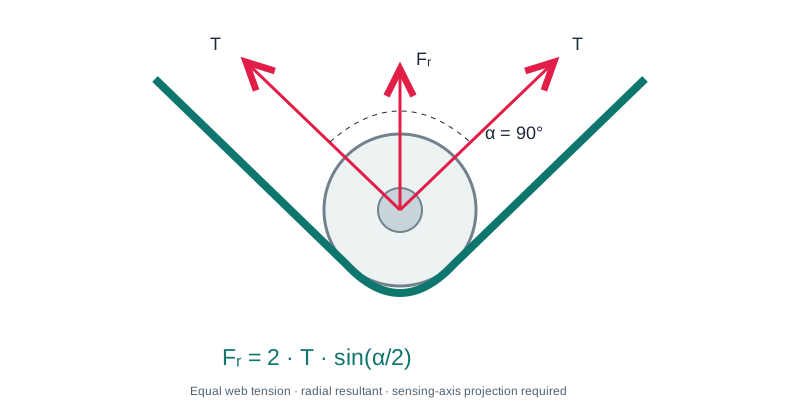
T is the tensile force across the full web width in each free span. For equal incoming and outgoing tension, the web-only resultant is R = 2T sin(α/2). Here α is the change in travel direction: 90° is a right-angle turn and 180° a full return.
The angle between the two outward tension vectors is 180° − α. If a drawing uses this included angle, convert it before entering α. The two conventions give the same vector sum.
φ locates the web resultant; ψ locates the positive sensing arrow. Both are counterclockwise from the right. The signed web signal is R cos(φ − ψ). At a 90° offset, that signal is zero even when the bearings carry a large load.
DFE’s tension-equipment worksheet distinguishes wrap and included angles and accounts for roll weight and force direction. Its model-specific load-rating formula is not copied as a universal capacity rule here.
Fᵣ = 2 · T · sin(α/2). α is web deflection: 0° is a straight path; 180° is a return path. Measured force is the component along the sensor axis.
Keep web load and tare in the same coordinate system.
W = m × 9.80665 N. For each support, s is its share of web force and q its share of supported dead weight. The force vector is f = sR(cos φ, sin φ) + (0, −qW). The table below defines each output independently.
Output
Calculation
What it answers
Raw sensing-axis force
fₓ cos ψ + fᵧ sin ψ
What force acts along the positive measuring arrow, before electronic zeroing?
Tared web signal
sR cos(φ − ψ)
What remains after subtracting the stationary, unloaded tare reading?
Perpendicular force
−fₓ sin ψ + fᵧ cos ψ
What transverse load must the sensor structure carry?
Total radial reaction
√(fₓ² + fᵧ²)
What combined in-plane load reaches this bearing/support?
For a load centroid at distance x from the left support over span L, the left reaction share is (L − x)/L and the right is x/L. Use separate centroids for web force and dead weight. A changing web position needs its own worst-case checks; a single fixed share does not model wander.
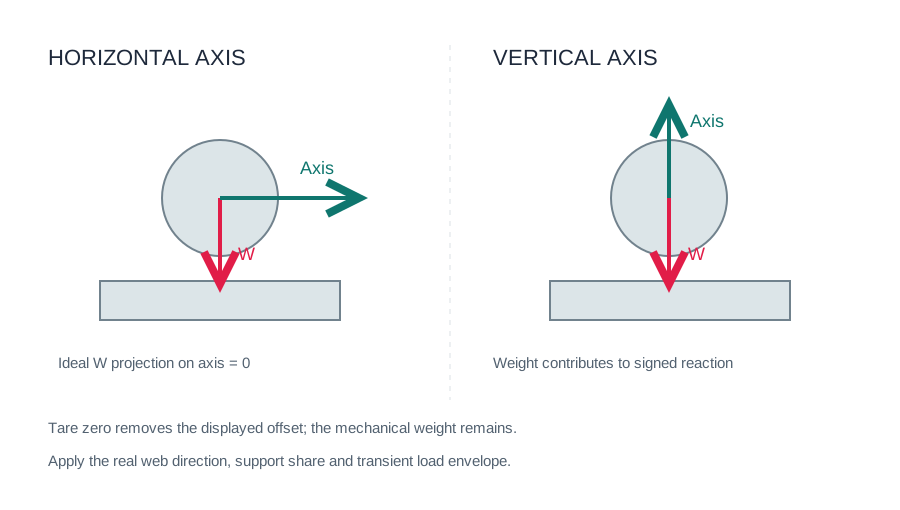
A horizontal signal can exclude weight while the bearing still carries it.
With ψ = 0°, vertical tare has zero projection on the sensing axis. The radial load still combines the horizontal web reaction and vertical weight reaction. A smaller sensing range may be feasible only if the exact sensor’s transverse and bearing limits permit it.
If the web resultant is vertical, horizontal sensing also loses the useful web signal. Review both directions before changing the installation. FMS’s paper-industry technical paper, pages 3–5, explains this horizontal/vertical tradeoff.
Owned direction sketch. A zero tare signal is not a zero bearing load.REPRODUCIBLE EXAMPLES / NOT PRODUCT RATINGS
Three cases that lead to different selection decisions.
All examples use equal supports, k = 2 and an illustrative 500 N nominal rating per sensor. They are calculated scenarios, not physical test results or released product configurations.
Downward film-roller load
T = 100–200 N; α = 90°; φ / ψ = -90° / -90°; supported mass 10 kg.
Per-support result
Value
Raw force at maximum running tension
190.45 N
Maximum absolute sensing-axis force, T = 0 to kTmax
331.88 N
Maximum total radial force over that interval
331.88 N
Minimum web signal / 500 N
14.14%
A 500 N per-sensor candidate meets the two axis screens. Radial and transverse service limits still need the exact model.
Heavy roller, horizontal axis
T = 100–200 N; α = 90°; φ / ψ = 0° / 0°; supported mass 100 kg.
Per-support result
Value
Raw force at maximum running tension
141.42 N
Maximum absolute sensing-axis force, T = 0 to kTmax
282.84 N
Maximum total radial force over that interval
566.06 N
Minimum web signal / 500 N
14.14%
Horizontal tare signal is zero, but the bearing and transverse load remain substantial. Do not select from axis force alone.
5–50 N web, 30° wrap
T = 5–50 N; α = 30°; φ / ψ = -90° / -90°; supported mass 1 kg.
Per-support result
Value
Raw force at maximum running tension
17.84 N
Maximum absolute sensing-axis force, T = 0 to kTmax
30.79 N
Maximum total radial force over that interval
30.79 N
Minimum web signal / 500 N
0.26%
The entered 500 N rating gives weak low-end signal. No common axis rating meets this example’s 10% screen and assumed peak; review geometry or a qualified wider-range system.
Check headroom and low-end signal together.
For fixed geometry, the support force varies linearly with T. The magnitude and absolute axis projection are convex, so the largest value over 0 ≤ T ≤ kTmax is at one of the two endpoints. The unloaded roller is included even if tare later cancels the web load.
Screen
Interpretation and next action
Absolute raw axis envelope ≤ entered nominal rating
Preliminary nominal headroom only. Confirm signed measuring range, tare headroom and permitted service load; hardstop or breaking load is not usable nominal range.
Minimum web signal / nominal ≥ selected 10% target
A conservative planning screen. An oversized sensor can meet peak loading yet give poor low-end signal. Check the complete signal chain.
Per-seat web signal / T ≥ 10%
Flags weak geometric transfer. It is distinct from the percent-of-nominal check.
Large projected tare
If tare exceeds one-third of nominal and minimum web signal is below 30% of tare, review drift and geometry.
Optional 6% target
A custom review assumption only. This tool does not qualify any BearingLoadCell sensor or amplifier for extended-range use.
Radial / transverse service limits
Use exact-model documentation. Unknown limits remain “not checked”; axial force, moments and bearing life need separate review.
The 10% geometry/nominal guidelines and conditional 30%-of-tare advice are discussed in ABB PFEA111/112 manual 3BSE029380R0101 Rev D, installation appendices. They inform advisory flags; they are not a universal sensor accuracy specification. The 6% option is not asserted as an ABB rule.
The displayed shared rating interval uses the larger axis envelope as its lower bound and the weaker support’s minimum web signal divided by the selected target as its upper bound. An empty interval calls for geometry or system review. A non-empty interval does not prove that a stock size or qualified assembly exists.
Zero the roller, then calibrate the actual web path.
Confirm the bearing arrangement, positive force arrows, left/right labels and signal polarity.
Record each unloaded raw channel. Zeroing removes its indication; it does not unload the bearing or recover unrestricted amplifier input range.
Use a known calibration force through the installed web path. Check each channel, the A+B sum and the geometric conversion to T.
Validate output scaling, filtering and alarm behavior at the PLC with the selected amplifier. Confirm start/stop loads separately.
Driven roller, bearing drag or unequal span tension
Add the two actual tension vectors independently. One equal-T input cannot represent traction or torque loss.
Cantilever, third support or overhung load
Use the real reaction and moment model. The 0–100% shares here describe two simple supports with load centroids inside the span.
Acceleration, vibration, web break or E-stop
Measure or simulate the transient load case. k = 2 is an adjustable planning envelope, not a shock prediction.
Vacuum, heat, washdown or minimum-tension resolution
Review the released sensor, bearing, grease, seals, drift/noise and electronics data; the force calculation does not qualify an environment.
Questions before choosing a roller-end range.
Is T the tension per bearing?
No. T is tensile force across the full material width in each web span. The resultant is then distributed to supports; only equal geometry and centered loading give 50/50.
Can I enter tension per metre or per inch of width?
Multiply by the actual material width first. Enter total force, not N/m or pli. N and lbf are force units; kg in the tare field is mass.
Why is raw force negative?
The force acts opposite the entered positive sensing arrow. If the range crosses zero, verify bidirectional operation and amplifier headroom before choosing a model.
Does the peak factor multiply roller weight?
No. This model multiplies maximum web tension only and keeps dead weight constant. A mechanical shock acting on the mass requires a different load case.
Is a lower 6% target a resolution guarantee?
No. It only changes an advisory sizing threshold. Approval depends on the exact bridge, excitation, amplifier, filtering, drift and calibration evidence.
Can I paste a pair-rated DFE load rating directly?
No. This tool requests a per-sensor nominal rating. Verify the original document’s rating basis and convert the configuration before comparison.
What happens when I send the result?
The RFQ carries the numeric input snapshot. The server recomputes all forces and includes unknown checks and assumptions in the actual email. Editing the RFQ load field clears the old snapshot.
What data completes the selection?
Send the shaft and mounting drawing, bearing model, speed, material width and tension range, force directions, centroids, environment and PLC interface. Confirm released dimensions, service limits and calibration scope before ordering.
Engineering method reviewed 28 October 2026. Independent preliminary calculator maintained by the BearingLoadCell web tension sensing division. Manufacturer sources explain original equipment; no physical BearingLoadCell qualification is inferred.
START WITH YOUR WEB PATH.
Two roller ends. One clear tension signal.
Share the shaft bore, web tension and PLC interface. Receive a configuration-specific mounting and signal review.